
Lessons Small Teams Can Learn From Good Design
Most CRM software is built for large sales organizations — complex processes, endless customization, and reporting layers most small teams never use.
But small teams don’t sell that way.
If your sales team is two to five people, a feature-heavy CRM often slows you down instead of helping you close deals. And just like poorly designed software, a poorly designed CRM forces people to think too much.
That’s why we believe CRM should follow the same principles as good design.
CRM That Works Like Good Design
Good design doesn’t get in the way.
It quietly removes friction.
A well-designed CRM should feel the same. You shouldn’t need training sessions, documentation, or special habits just to update a deal or know what to do next.
When CRM is designed well, it helps teams move faster — almost without noticing the tool itself.
In both design and CRM, clarity in what you see directly affects how quickly and confidently you act.
Design Lessons That Matter for Small Teams
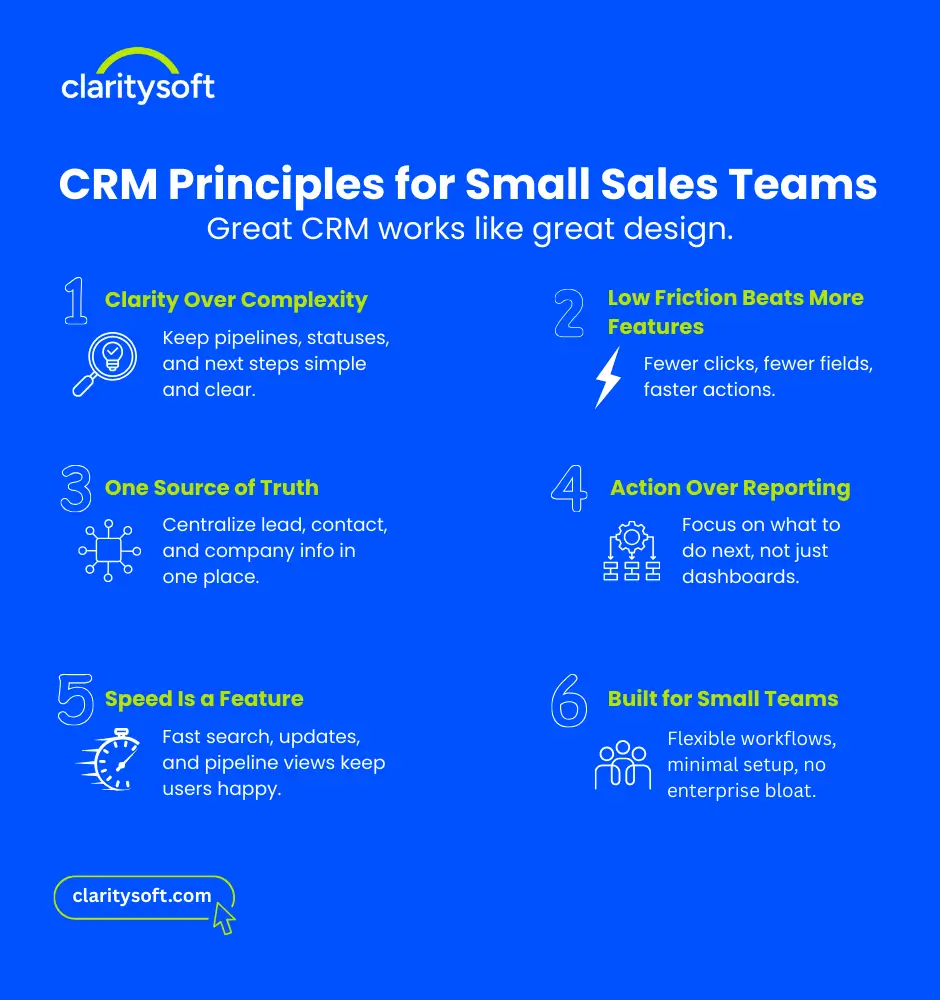
Lesson 1: Clarity Always Beats Complexity
If you open a CRM and immediately wonder:
- Where is this lead?
- What’s the next step?
- Who owns this deal?
That’s a design problem.
Good CRM design makes the answers obvious — with clear pipelines, simple statuses, and visible next actions. If it’s not clear in five seconds, it’s not clear.
Lesson 2: Less Friction, More Momentum
Every extra click slows people down.
Every unnecessary field adds friction.
Small teams don’t need more features — they need fewer obstacles. A well-designed CRM removes steps instead of adding them, making updates quick and easy.
When CRM feels effortless, people actually use it.
Lesson 3: One Trusted Source of Truth
A good design always makes it clear where the right information lives.
Your CRM should do the same.
If deal details are scattered across email, Slack, and spreadsheets, trust breaks down. A well-designed CRM becomes the one place your team relies on — naturally, without enforcement.
Lesson 4: Visual Clarity That Drives Action
Clean layouts and thoughtful design aren’t just about aesthetics — they guide focus.
A well-designed CRM helps small teams quickly see:
- Who needs a follow-up
- Which deals are slowing down
- What deserves attention today
Insights are most valuable when they lead directly to action. Good design makes that path obvious.
Lesson 5: Speed Is a Usability Requirement
If a CRM feels slow, people avoid it.
Fast search, instant updates, and responsive pipelines aren’t “nice to have” — they’re essential. Speed keeps teams in flow and removes hesitation.
Lesson 6: Designed for Small Teams, Not Enterprise Theater
Many CRMs assume every business will grow into a complex sales organization.
Small teams need something different:
- Minimal setup
- Flexible workflows
- Tools that adapt to how they already sell
Good design meets teams where they are — without forcing unnecessary complexity.
Why This Approach Works
Most CRM problems aren’t data problems.
They’re behavior problems.
People avoid tools that feel confusing, slow, or burdensome. Good design aligns CRM with how people actually work — especially in small teams where time and focus matter.
When CRM is designed right, adoption happens naturally.
Claritysoft: CRM Built on Good Design Principles
Claritysoft was built around these design lessons from the start.
It pairs a clean, modern interface with workflows designed to keep small teams focused and moving forward.
Claritysoft is built for:
- Clear, visually organized pipelines
- Fast, action-first workflows
- Simple experiences that feel intuitive from day one
No unnecessary fields.
No enterprise-level complexity.
No training required.
Just a CRM designed to help small sales teams see clearly, act quickly, and stay focused on what matters.
If Your Team Is Small, Your CRM Should Be Too
If you’re looking for a CRM that works more like good design than enterprise software, Claritysoft was built for you.