
As businesses grow, the ERP often becomes the center of everything.
Orders, inventory, pricing, accounting. Then someone tries to manage sales there too. Notes, follow ups, pipeline, conversations.
Before long, the ERP is doing far more than it was designed for.
“Your ERP runs the business. Your CRM manages the relationships that drive it.”
Here is how to separate the two so your systems actually work.
What Is an ERP System Used For?
Your ERP is your operational system of record.
It is built for accuracy, structure, and financial truth.
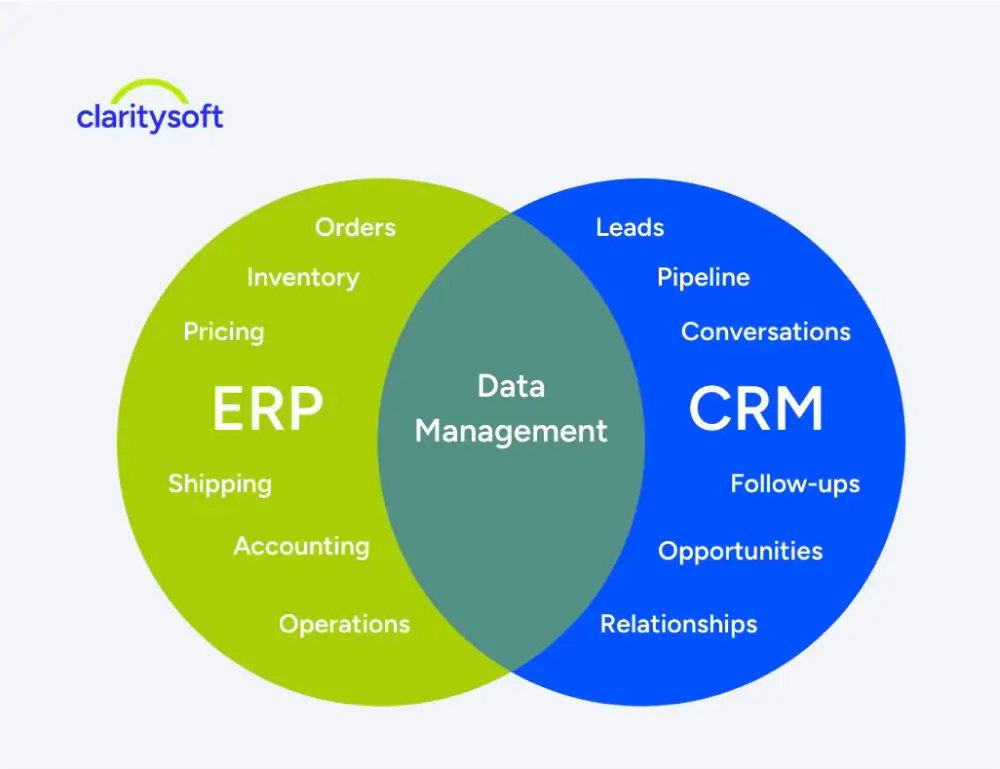
Typically includes:
• Orders and invoices
• Inventory and product availability
• Pricing and cost data
• Shipping and fulfillment
• Accounting and reporting
• Manufacturing and supply chain
This is where transactions live.
It is not where relationships happen.
What Is a CRM System Used For?
Your CRM manages everything before and around the sale.
It is designed for visibility, flexibility, and daily use.
It should handle:
• Leads and prospects
• Sales pipeline and opportunities
• Customer conversations and history
• Tasks and follow ups
• Marketing engagement
This is where relationships are built and managed.
Should Sales Activity Be in an ERP?
Short answer: no.
ERPs are not designed for fast moving sales work.
When companies try to force sales into the ERP:
• Sales teams stop updating data
• Notes and conversations go missing
• Pipeline visibility disappears
• Forecasting becomes unreliable
The system becomes technically complete but practically useless.
Where Should Leads and Opportunities Be Tracked?
Inside your CRM.
This includes:
• Website inquiries
• Marketing leads
• Trade show contacts
• Distributor referrals
• Deals in progress
Your ERP only sees the order after it happens.
Your CRM shows everything leading up to it.
How to Track Customer Communication and Follow Ups?
This belongs in your CRM.
Track:
• Calls, emails, and meetings
• Notes and context
• Follow up reminders
• Renewal timelines
• Cross sell opportunities
Without this, you only see transactions, not relationships.
How CRM and ERP Work Together
The goal is not one system. It is alignment.
A strong setup looks like this:
• ERP manages orders, inventory, and financials
• CRM manages pipeline, conversations, and relationships
• Key data syncs between both systems
This gives each team what they need without overlap.
Why Companies Try to Use ERP for Everything
Common reasons:
• “We want everything in one place”
• “The ERP already has customer records”
• “We want to avoid duplicate data”
In reality:
• One system becomes too rigid
• Sales teams avoid using it
• Data becomes incomplete
Modern systems solve this through integration, not consolidation.
Signs You Need a CRM Alongside Your ERP
If you are seeing any of this:
• Sales activity is not being tracked consistently
• You cannot see your pipeline clearly
• Forecasting requires guesswork
• Customer conversations live in inboxes
• Sales teams avoid updating the system
The issue is not your ERP.
It is that you are asking it to do the wrong job.
Final Thought
Your ERP is critical. It runs your operations.
But it was never meant to manage conversations, follow ups, or relationships.
When you separate operational data from relationship management, both systems perform better and your team gains real visibility into how revenue is built.
A CRM does not replace your ERP.
It makes it more effective.